
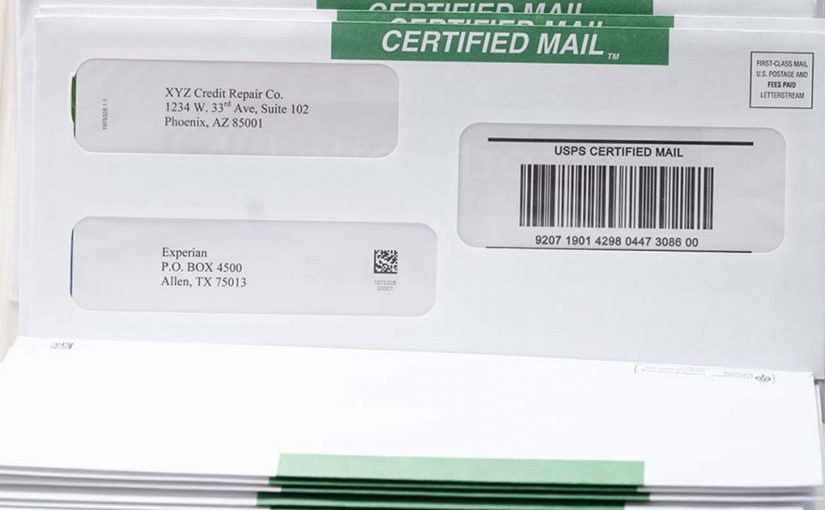
You can send Certified Mail online in minutes—no green cards, no Post Office lines, no manual forms. If you manage business-critical mail, Certified Mail should be part of a structured workflow, not a task that pulls you away from your desk.
Certified Mail still carries legal and operational weight in 2026. HOAs rely on it for violation notices. Law firms use it for demand letters. Property managers depend on it for tenant communication. Healthcare administrators use it for compliance documentation. The list goes on. The question isn’t whether Certified Mail matters—it’s whether your process is built for speed, accuracy, reliability, and documentation.
When you send Certified Mail online through The Stream at LetterStream, the entire process—from upload to USPS entry—moves through a defined, trackable path designed to eliminate manual steps and reduce risk.
Here’s exactly how to send Certified Mail online—and why it’s smarter than the traditional process.
Why Certified Mail Still Matters for Business
Certified Mail, offered by the United States Postal Service (USPS), provides proof of mailing and a tracking number tied to your letter. When combined with a Return Receipt, it also provides a documented signature record.
That documentation can support:
- Legal notice requirements
- Compliance verification
- Dispute resolution
- Internal recordkeeping
In many industries, it’s not enough to say, “We sent the letter.” You may need to prove when it entered the USPS system and whether a signature was captured.
Traditionally, sending Certified Mail required printing the letter, completing PS Form 3800, attaching labels, and waiting in line at the Post Office. That manual process slows teams down and increases the chance of errors.
Sending Certified Mail online replaces that entire sequence with a structured digital workflow.
Step-by-Step: How to Send Certified Mail Online
Using a modern print and mail service like The Stream, the process is straightforward.
Step 1: Upload Your Document
Log in and upload your PDF. Whether it’s one letter or a batch, the file enters a secure workflow immediately.
Step 2: Select Certified Mail
Choose Certified Mail as your mail class. If you need signature confirmation, add Electronic Return Receipt during this step.
Step 3: Review and Confirm
Verify recipient addresses, return address, and mail class. This checkpoint protects accuracy before production begins.
Step 4: Submit
Once submitted, the document moves through printing, inserting, postage application, and entry into the USPS network—without you handling a single envelope.
Tracking numbers are generated and stored in your account. If you selected Electronic Return Receipt (ERR), signature documentation becomes accessible digitally once it has been signed.
That’s it. No trip across town. No retail counter. No handwritten forms. No chaos.
When you send mail online this way, Certified Mail becomes part of your normal workflow instead of a special project.
What You Can Gain by Sending Certified Mail Online
The difference between manual processing and sending Certified Mail online isn’t just convenience, it’s control and consistency.
Here’s what changes operationally:
- Tracking numbers are stored automatically
- Mailing history is centralized in your dashboard
- Signature records are accessible digitally
- Volume doesn’t increase complexity
- Staff time is freed up immediately
- No lost green cards
For organizations sending recurring Certified notices—like law firms, HOAs, or property management firms—this shift can reclaim hours every week.
Certified Mail shouldn’t disrupt your day. It should integrate into your existing systems.
Can You Send Certified Mail Online in Bulk?
We get this question a lot. Yes, you can send Certified Mail online in bulk. In fact, this is where online systems shine.
If you’re sending one Certified letter per month, the traditional method may feel manageable. But if you’re sending dozens or hundreds, the math changes quickly.
Bulk Certified Mail online allows you to:
- Upload multiple documents
- Apply Certified Mail settings at scale
- Generate multiple tracking numbers automatically
- Monitor status from one dashboard
Instead of managing stacks of receipts, you manage a digital record.
The Best Way to Send Certified Mail in 2026
In 2026, most business systems are automated:
- Accounting platforms
- Property management software
- Legal case management tools
- Customer databases
- And more
If Certified Mail is still being handled with paper forms and retail visits, it’s out of sync with the rest of your operations.
Sending Certified Mail online aligns this critical communication channel with your broader digital infrastructure.
At LetterStream, the focus is simple: be the best way to send mail, period. That means Certified Mail that’s fast, accurate, and reliable—without unnecessary steps.
When your mail carries legal or operational consequences, the process behind it should be just as dependable.
To learn more about LetterStream or to sign up for a free account, click here.
LetterStream offers bulk printing and mailing services, allowing companies to send physical mail online. Whether it’s online Certified Mail, First-Class Mail, FedEx 2Day, or postcards, we give both small businesses and large corporations the time and freedom back to work on tasks that better serve the company. If you’re interested in creating a free account, you can do so here.