Certified Mail Signature Confirmation: How Do I Get One?

A common question we get is: Can I get a Certified Mail signature confirmation? The answer is simple: yes, you can get signature confirmation when you send Certified Mail online—and if you’re handling legal, financial, or compliance documents, you probably should. 

Certified Mail is designed to provide proof that something was sent and that someone signed for it. When you use a print and mail service like The Stream at LetterStream, that entire process—from generating tracking to capturing signature records—can be handled online, and in your account, without standing in line at the Post Office. 

Let’s clarify how signature confirmation works, what it actually proves, and how to send Certified Mail online the smart way. 

What Does Certified Mail With Signature Confirmation Include? 

Certified Mail is a service offered by the United States Postal Service (USPS) that provides: 

  • A mailing receipt 
  • A unique tracking number 
  • Confirmation that the item was presented to the recipient 
  • A signature record (if Return Receipt is selected) 

According to USPS, Certified Mail provides the sender with proof of mailing, and it can be combined with Return Receipt (proof of signature).

There are two important components to understand: 

1. Certified Mail Tracking 
This confirms that your item was processed through the USPS system and shows key status updates. 

2. Return Receipt (Signature Confirmation) 
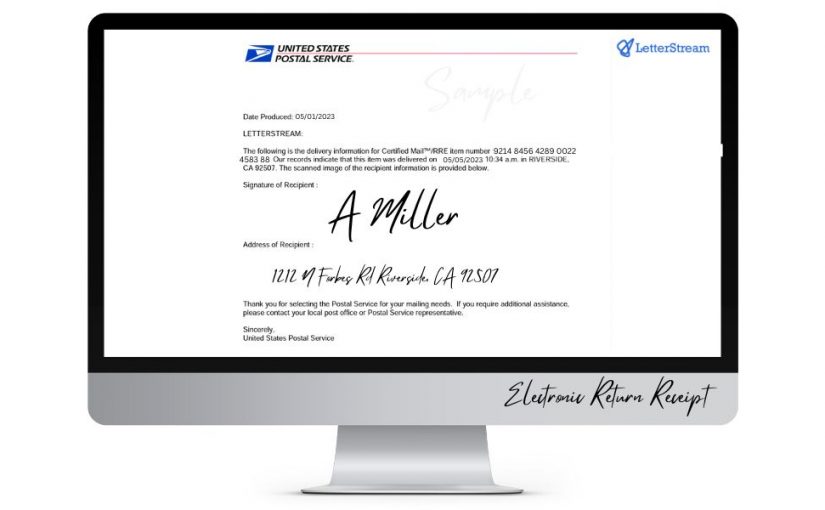
This provides documentation that someone signed for the mail piece. It can be electronic (Electronic Return Receipt) or physical (green card). 

When people ask, “Can I get a signature confirmation?” they’re usually referring to adding Return Receipt to Certified Mail. 

And yes—you can do this entirely online. 

Why Signature Confirmation Matters for Business Mail 

Not every letter requires a signature. But some absolutely do. 

For example: 

  • HOA violation notices 
  • Legal demand letters 
  • Compliance notifications 
  • Tenant-related communications 
  • Collections correspondence 

In these cases, it’s not enough to say, “We sent it.” You may need to prove: 

  • The date it was mailed 
  • The date it was presented 
  • That a signature was captured 

That documentation can be critical in court proceedings, disputes, or regulatory audits. 

When you send mail online using Certified Mail with Electronic Return Receipt (ERR) through The Stream, you gain digital access to tracking and signature records inside your account. That means no filing cabinets full of green cards and no manual spreadsheets tracking numbers. 

For organizations that send high volumes of formal correspondence, this is a significant operational upgrade. 

How to Send Certified Mail Online With Signature Confirmation 

Traditionally, sending Certified Mail required: 

  • Printing your letter 
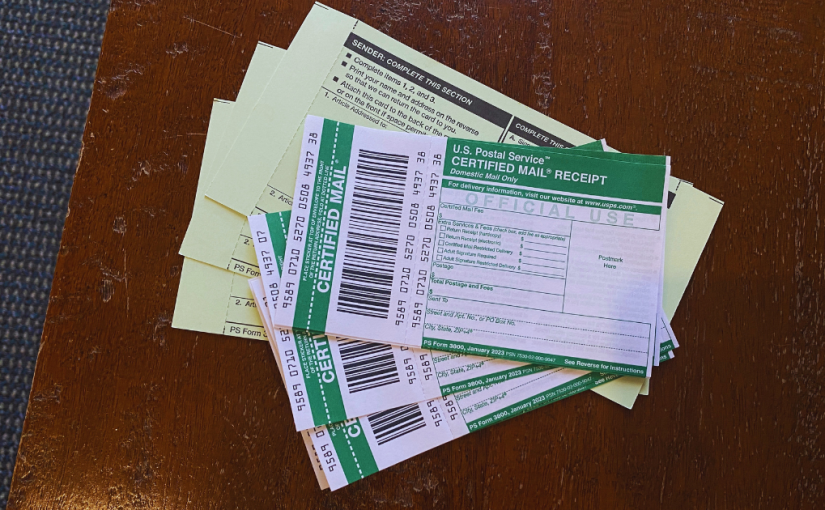
  • Filling out PS Form 3800 (Certified Mail receipt) 
  • Attaching a green card (Return Receipt) 
  • Waiting at the Post Office counter 
  • Retaining physical copies for your records 

That process introduces time delays and manual errors. 

When you send Certified Mail online through LetterStream, the steps are streamlined: 

  1. Upload your PDF 
  1. Select Certified Mail 
  1. Add an Electronic Return Receipt (signature confirmation) 
  1. Confirm and submit 

The system applies the correct labeling and tracking automatically. Tracking numbers are stored in your dashboard, meaning you never have to type in a tracking number again. Signature documentation then becomes accessible digitally once processed by USPS. 

The key difference is control. You manage everything from your desk instead of a retail counter. 

Managing Certified Mail at Scale 

If you’re sending one certified letter per month, manual processing might feel manageable. 

If you’re sending fifty—or five hundred—it becomes a workflow problem. 

When HOAs send multiple violation notices, or law firms send batches of demand letters, the administrative load grows quickly: 

  • Tracking numbers must be recorded 
  • Status updates must be monitored 
  • Signature records must be retained 

Using a structured print and mail service centralizes that process. Instead of managing stacks of receipts, you access everything in one account. 

When you send mail online with LetterStream, Certified Mail tracking and signature confirmation are integrated into the same Stream as your other mail classes. That means consistency across your communications. 

Consistency reduces risk. And when business-critical mail is involved, risk reduction matters. 

The Smarter Way to Handle Signature Confirmation 

Signature confirmation isn’t about formality. It’s about documentation. 

If your organization depends on proof that notices were properly sent and acknowledged, Certified Mail online with Electronic Return Receipt provides that structure. 

The real shift isn’t just adding a signature option. It’s moving the entire process online: 

LetterStream focuses on being the best way to send mail online—that is, fast, accurate, and reliable. That includes making Certified Mail and signature confirmation simple enough to manage at scale without sacrificing control. 

Mail still carries legal and operational weight. The way you send it should reflect that. 

To learn more about LetterStream or to sign up for a free account, click here

LetterStream offers bulk printing and mailing services, allowing companies to send physical mail online. Whether it’s online Certified Mail, First-Class Mail, FedEx 2Day, or postcards, we give both small businesses and large corporations the time and freedom back to work on tasks that better serve the company. If you’re interested in creating a free account, you can do so here. 

LetterStream small logo

Why Certified Mail is Better Managed Online

When it comes to sending important documents, Certified Mail offers peace of mind. But did you know that managing Certified Mail online can streamline the entire process? If you’re still standing in line at the post office, it’s time to rethink your strategy. Let’s explore why Certified Mail is better managed online and how this method can save you time, effort, and even money. Sound good?

The Convenience Factor: Manage Certified Mail Anytime, Anywhere

Gone are the days when sending Certified Mail meant taking time out of your busy schedule to visit the post office. Managing Certified Mail online allows you to create and easily send your letters from any location—whether you’re sending Certified Mail from home, the office or even on the go, it’s extremely convenient.

With LetterStream, you can:

  • Upload your documents securely.
  • Easily select Certified Mail for your critical documents without the hassle of manual processing.
  • Track your Certified Mail in real-time right from inside your account without having to type in your tracking number.
  • For mail requiring a signature, there’s an option to choose an Electronic Return Receipt (ERR) in place of the old-fashioned Green Card and be able to see the digital signature in your account.

The convenience of sending Certified Mail online is particularly valuable for businesses that send a high volume of Certified Mail, such as legal firms, financial institutions, and HOAs. LetterStream’s seamless process eliminates manual steps, ensuring your mail gets out quickly and reliably.

Real-Time Tracking and Instant Documentation

One of the key benefits of Certified Mail is the ability to track its journey from sender to recipient. However, keeping track of physical receipts and status updates can be cumbersome when done manually.

LetterStream’s platform allows you to easily gain real-time tracking updates and access to detailed documentation at your fingertips. You can:

  • Monitor delivery progress instantly within the platform.
  • Access electronic delivery confirmations as soon as they are available.
  • Download proof of mailing and delivery for your records.

This digital documentation ensures that you always have verifiable proof on hand, which can be crucial in industries requiring compliance with strict legal or regulatory standards.

Improved Efficiency for Businesses

Managing Certified Mail through online platforms reduces administrative overhead. Manually preparing, printing, and mailing Certified letters is both time-consuming and error-prone. LetterStream’s system streamlines these steps by automating key tasks, such as:

  • Automated printing, folding, inserting, and mailing services.
  • Bulk mailing options for high-volume needs.
  • Address verification to prevent delivery errors for an additional fee.
  • Expedite mailing option for the last-minute letters that need to be sent ASAP.

Businesses that frequently send Certified Mail—for example, for contracts, notifications, or compliance letters—can significantly reduce time spent on mailing tasks and allocate resources more effectively with LetterStream’s tailored solutions.

Cost Savings Through Automation

While Certified Mail is essential for critical documents, the costs of handling it manually can add up. Factor in postage, printing, administrative time, and travel to and from the post office, and you may find yourself with a hefty bill.

LetterStream helps mitigate these costs by offering customers the convenience of having it done for them. No extra money spent and the ability to get your time back to focus on other high priority tasks.

These savings are particularly impactful for small businesses looking to optimize their operational budgets. With LetterStream’s transparent pricing and scalable options, you can control costs without sacrificing service quality.

Enhanced Security and Compliance

In today’s digital world, security and compliance are non-negotiable. Certified Mail is already a secure method for sending sensitive documents, but managing it through LetterStream elevates those protections even further.

All LetterStream employees are HIPAA-certified, ensuring that documents containing Protected Health Information (PHI) are handled and mailed with the utmost security. Our IT department follows rigorous security protocols, including 128-bit encryption on the website, safeguarding sensitive data during every transaction. Physical security is equally robust—our production facilities allow no unescorted visitors, and access is strictly monitored with electronic sign-ins.

Additionally, LetterStream securely disposes of any unmailed printed documents through shredding and offers customers the ability to purge documents from their accounts at specified times. As part of ongoing initiatives to strengthen data protection, we are actively pursuing SOC 2 certification to further enhance compliance measures. Through these practices, we ensure that businesses in industries like healthcare, legal services, and finance can trust their data and communications are protected at every step.

These features are critical for industries that handle confidential information, including healthcare, legal services, and finance. LetterStream ensures that your data and communications are protected at every step.

Environmentally Friendly Mailing Solutions

Managing Certified Mail online isn’t just about convenience and efficiency—it’s also a step toward more sustainable business practices. By reducing the need for physical trips to the post office, as well as paper-based tracking and documentation, you can lower your carbon footprint.

LetterStream allows you to opt for digital receipts and records to minimize paper waste and to utilize batch processing to reduce the environmental impact of individual mailings.

For companies committed to corporate social responsibility (CSR) initiatives, online Certified Mail solutions like LetterStream align with broader sustainability goals.

Simplify Your Certified Mail Process

Certified mail is a crucial tool for sending important documents securely and with proof of delivery. By managing it online through LetterStream, you gain unparalleled convenience, efficiency, and security. Whether you’re a business leader, an HOA manager, or a legal professional, transitioning to an online solution can transform how you handle critical communications.

Ready to streamline your Certified Mail process? Explore Online Printing & Mail Services – Send Your Letters The Easy Way – LetterStream to learn more.

If you’re wondering how much is Certified Mail to send, click here to view our prices. If you’re wondering how to send a certified letter online through our website, create a free account here to get started.

LetterStream small logo

How Does USPS Certified Mail Work?

Do you ever feel confused by the different options when it comes to sending mail or even just the terminology itself? Don’t feel bad, you’re not alone. It can be hard to know when to send something as First-Class Mail over Certified Mail, or when to send via FedEx vs United States Postal Service (USPS). In this article we’re not going to break down each type of mailing (we’ll save that for another day), but we will give you a little breakdown of Certified Mail and how it works.

What Is Certified Mail?

Certified Mail is a secure and reliable service offered by the United States Postal Service (USPS) that provides proof of mailing and delivery. Whether you’re sending important documents, legal papers, or sensitive information, Certified Mail offers an extra layer of assurance and peace of mind.

Sending Certified Mail

You may be wondering what the USPS Certified Mail process entails. In order to send Certified Mail, you need to fill out PS Form 3800, which serves as proof of mailing. The USPSP Certified Mail requirements includes a form to be filled out with the recipient’s address, your return address, and additional details such as insurance and registered mail options if necessary.

The Certified Mail fees are the same no matter how many or how few pieces of paper are in the envelope. However, First-Class postage does increase with each additional ounce of weight.

When you hand over the item at the Post Office counter, the clerk will provide you with a stamped proof of mailing. Once the payment is made, you will receive a receipt with a unique tracking number. This receipt includes the date and time of mailing, as well as the tracking number. It is crucial to keep this receipt safe as it serves as evidence of your sending the item.

Tracking and Delivery

The great thing about USPS Certified Mail is that it comes with a tracking feature that allows you to monitor the progress of your mail piece. Using the unique tracking number provided on the receipt, you can look up your tracking number by accessing the USPS website or mobile app to check the delivery status.

The tracking information typically includes the date and time of acceptance, arrival at various postal facilities, and final delivery confirmation.

Once the Certified Mail item reaches the recipient’s local post office, the carrier will attempt delivery. They will bring the Certified Mail to the recipient’s front door looking for someone to be available to accept it. If the recipient is unavailable, a delivery notice will be left, informing them about the arrival of a Certified Mail item. The recipient can then choose to either pick it up from the post office or schedule a redelivery.

Keep in mind, if you want additional proof of delivery, you can request a USPS Certified Mail signature, also known as a Return Receipt or Green Card or more technically as PS Form 3811. This service provides a copy of the recipient’s signature and date of delivery, which is mailed back to you.

There is also an Electronic Return Receipt, which is the same as the Return Receipt except in digital form. A copy of the recipient’s signature gets emailed directly to you instead of being sent via regular mail.

Both options serve as concrete evidence that the item was delivered to the intended recipient.

Using LetterStream to Send Certified Mail

So now that you know how sending Certified Mail works, let’s go over another way to send your certified letter. Through us!

LetterStream offers a different approach to sending Certified Mail. It’s not only easier but also way more convenient than the traditional way. It’s so convenient that you don’t have to leave your home, office, or wherever you are in that moment. Pretty nifty, huh?

Ready for how easy it is? You can literally upload your documents in just minutes and then have your Certified letter sent through our online portal without doing any other work, without wasting anymore time and without having to go to the post office. That’s it! Easy, right?

And, like we mentioned above, we also offer USPS Certified Mail tracking right inside of your online portal for quick and easy access. There’s never a need to keep track of, or enter, your tracking numbers because we keep track of them for you.

Click here to learn more about sending your Certified letter as Certified Mail through us.

Benefits and Considerations

Let’s talk about some benefits and considers when it comes to sending Certified Mail. The primary benefit of using the USPS Certified Mail process is the proof of delivery it offers. With the stamped proof of mailing and the tracking information, you have tangible evidence that you sent the item and that it was delivered to the recipient.

Certified Mail is often used for legal documents, court papers, and official correspondences, as it provides a level of assurance that is crucial in these contexts. It can be used to establish timelines, fulfill legal requirements, and maintain records of important communications.

While USPS strives to deliver Certified Mail promptly, it is essential to consider the timeframe for delivery. Depending on the distance and other factors, delivery may take several days.

Just be prepared; Certified Mail is not an overnight or expedited process. Actually, it could be slower than First-Class Mail as the mail carrier attempts to catch someone at home in order to collect a signature. If all goes well, a Certified Mail letter can be delivered in less than 5 business days, but don’t be alarmed if the process takes 15 business days or ever more in some cases.

To sum it up, USPS Certified Mail is a valuable service that adds an extra layer of security and proof of mailing (and sometimes delivery) when sending important documents or sensitive information. By going through the traditional way of sending certified mail or by using our online portal, you can easily track your item’s journey and ensure its delivery to the intended recipient.

Certified Mail – Return Receipt vs Electronic Return Receipt (ERR)

What is the difference between a Return Receipt and an Electronic Return Receipt (ERR)?

Actually, let’s get more specific, shall we? What are the different types of Return Receipts for Certified Mail?

There are two different ways to get a Return Receipt through the United States Postal Service (USPS) for your Certified Mail. The first is the traditional green card, also known as PS Form 3811, which the Postal Service calls a Return Receipt.

The second method is an Electronic Return Receipt (ERR). No special forms are needed to purchase or take advantage of with ERR. An Electronic Return Receipt, simply put, is an electronic version of a Return Receipt.

Do I Need a Return Receipt?

Let’s back up just a bit and point out that you may not even need a Return Receipt for your Certified Letter. A simple Certified Letter without a Return Receipt will provide tracking on USPS.com or various other websites that have access to USPS tracking data, like LetterStream.com and www.OnlineCertifiedMail.com. So, if you just want to know the status of your letter, you may not need to spring for the additional expense of a Return Receipt.

The Return Receipt, however, does give you the added information of the name and signature of the person who received your letter. This provides you with a little extra information and might help you prove that someone actually saw your letter and took it into their hands.

Return Receipt Vs Electronic Return Receipt

So, back to the differences between Return Receipts. A Return Receipt, also known as a green card, is a green pre-printed postcard that you can pick up at your local post office and apply to the back of the Certified letter you are about to mail.

You will need to add your address to the green card or the address where you’d like the green card sent after the letter gets signed for. You’ll also want to put the tracking number from the Certified Mail barcode label (PS Form 3800) on the green card as well so you will know specifically which letter the green card relates to.

After paying the extra fees for Return Receipt and attaching the form to your letter, you are ready to give the letter to the USPS and let them do their part. When they deliver your Certified letter with a Return Receipt included, they will have the person who gets your letter sign the green card.

The postal carrier will then take the green card back to the USPS and put it in the mail so it will be returned to the sender. If all goes well, you’ll have your green card back in no time (or maybe longer, just depends).

The process gets a bit simpler with Electronic Return Receipt. You simply tell the USPS cashier that you’d like to send your Certified Letter with ERR. No extra forms are required, but there is a charge for this service. The cashier will scan the Certified Mail barcode (PS Form 3800) that you’ve placed on your letter. This tracking number will appear on your USPS receipt along with the fees for Electronic Return Receipt. You will then be able to use this tracking number to check the status of your Certified letter.

Collecting a Signature

When the mail carrier delivers your Certified letter, they will collect a signature either on the green card or on their digital tracking pad. When they get back to their office, they will either scan it into their computer system or they will download the signatures from their digital tracking pad.

Once the signature is in their computer system, they will create an electronic document/letter providing details of the delivery. It will show the date the letter was delivered and include the signature of the person who received the letter. If you choose to send it as a Return Receipt, the green card will get mailed back to you. If Electronic Return Receipt is chosen, this document will not be mailed to you; however, you can go to USPS.com, enter the 20-digit tracking number from your receipt, and request the signature via email when it is available.

If you choose to mail your Certified letter, either through LetterStream or OnlineCertifiedMail.com then you can access a copy of the Electronic Return Receipt right in your online portal.

Is There a Difference Legally?

Some people want to know if there is a difference in the legal authority of a green card compared to an ERR. Long ago, the USPS claimed on its website that there was no legal difference; however, they soon discovered that they are not the judge of that. Instead, the ultimate authority belongs to the local judge who gets to determine whether they are the same or not.

From our experience, the Electronic Return Receipt is accepted by most judges. We haven’t heard even a rumor of a judge tossing out the ERR as valid proof of delivery. If in doubt, we suggest that you contact the local authorities and see if they can confirm that an ERR is just as binding as a green card.

To sum it up, Return Receipt and Electronic Return Receipt both provide the same value when it comes to the added information of the name and signature of the person receiving your Certified letter. One is actually just a bit more convenient than the other.