"The Stream" – Providing Unmatched Speed, Accuracy, and Reliability For Customer Mailings. Includes USPS First-Class Mail, Certified Mail, Postcards, and FedEx 2Day
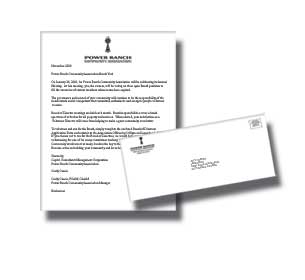
Wow, January is a tough month on volunteers in churches and other non-profit organizations that need to send out year-end charitable giving statements (or annual contribution statements).
This is the time of year you see church secretaries and bookkeepers hauling boxes of paper and envelopes to their cars so they can get their family involved in folding, stuffing, addressing, sealing and mailing the giving statements. This process can take its toll on church staff as they are hesitant to get other church members and “givers” involved due to the sensitivity of this information.
If your organization is looking for an easier and faster method, consider using LetterStream.com to accomplish this mailing. Some local churches actually bring their pre-printed documents directly to us for folding, inserting and mailing. However, most of our non-profit clients simply upload their contribution statements to our secure website for us to print and mail for them.
One thing to remember is that charities are not allowed to use their non-profit permit, standard or bulk postage for these statements. Instead, the United States Postal Service (USPS) requires that statements be sent via First-Class Mail.
If you’d like to give LetterStream a try, choose the “Pre-Addressed PDF (1stclass)” job type from our website and upload some sample statements, or simply give us a call and mention this blog post for personalized assistance. We think you’ll discover a welcome relief to your year-end giving statement mailing.
It’s often hard to read between the lines and figure out if postage rates have been officially approved or simply proposed by the United States Postal Service (USPS).
For instance, the September 2013 USPS rate increase announcement was actually just a proposal to increase postage prices. In order for new postage rates to be known for certain, they needed to be approved by the Postal Regulatory Commission (PRC).
“The Commission is an independent agency that has exercised regulatory oversight over the Postal Service since its creation by the Postal Reorganization Act of 1970. The Commission is composed of five Commissioners, each of whom is appointed by the President, by and with the advice and consent of the Senate, for a term of six years.” – https://www.prc.gov/
The PRC made the official announcement 3 days ago on December 24, 2013 that the USPS proposed postage rates are approved and will go into effect on January 26, 2014. Click to read the press release.
The price of a first-class stamp is increasing from $.46 to $.49 cents; an increase of $.03 per postage stamp.
Common postage prices to be aware of include:
Letters (1 oz.) — 3-cent increase to 49 cents
Letters additional ounces — 1-cent increase to 21 cents
Letters to all international destinations (1 oz.) — $1.15
Certified Mail service by the postal service is also seeing price increases. Certified Mail base fees will be $3.30. Certified Mail Green Card fees(PS Form 3811) will increase to $2.70 while Electronic Return Receipt (ERR) fees will increase to $1.35. For simpler math, a certified letter weighing less than an ounce with green card receipt will cost $6.49 each at the Post Office ($.49 first-class postage + $3.30 certified mail fee + $2.70 certified mail return card).
I was flying out of town the other day and picked up a Popular Science magazine to read on the flight. I was happy to see the title was “100 Best Innovations of the Year” and wondered if any of our mailing innovations had made the list. There are a few different mailing innovations that we rolled out this year and I thought I might find one or two discussed in the magazine.
For instance, we have our innovative Return Mail Processing service where we can process our clients’ return mail. This is a good way to keep undeliverable mail from being returned to our customers. Instead, we get it. Then we flag all the addresses in our customer’s account that have been returned, showing the return date and the return reason from the USPS yellow sticker. In addition, reports can be run by user, date range, mail type and many other filters for the letters that were returned.
Another innovation is our USPS Registered Mail solution, which allows users to create and send Registered Mail on our website. If you send Registered Mail, you know that it is one of the most time-consuming and confusing types of mail that you could possibly send. True to LetterStream’s form, we make the process so easy you can create the registered letter–or hundreds of them–in around 2 minutes on our website. We keep track of the USPS tracking information and the signature cards in an orderly fashion on our website.
Some may say that our online Certified Mailprocess is the most innovative Certified Mail solution they’ve ever seen. We’d like to agree… but we’ve been processing Certified Mail this way for nearly 10 years,so it might not be an innovation of this year.
We’ll, I’ve skimmed the 100 Best Innovations article, and unfortunately I could not find the name LetterStream. But that’s ok, our customers repeatedly give us the honor of being great innovators in the mailing business, and they are the ones we want to please.
If you want to learn more about our mail innovations, check out our website, explore our blog or pick up the phone and call us.
One of the many little-known features of the LetterStream website is the ability to schedule a mailing to go out on a specific date. It’s a handy feature to be familiar with when you have a mailing that needs to be sent on a date that coincides with a vacation you’re planning, or an upcoming holiday.
Imagine creating a mailing, scheduling it for a future date and taking off for vacation. While you are sitting on the beach one evening an email arrives from LetterStream letting you know that your mailing went out according to plan. Ah, now that’s what I call a vacation!
Scheduling is fairly simple; after your job is created, click the “Edit” button under the options column on the job listing page. Then choose the option called “Change Scheduled Date” and enter the date you want your mailing to be delivered to the Post Office. We’ll take care of it from there.
Keep in mind, the schedule tool is for delaying a mailing for a specific date. If you need your mailing to go out the door faster, choose the expedite or rush option for faster processing.
On that day let us solemnly remember the sacrifices of all those who fought so valiantly, on the seas, in the air, and on foreign shores, to preserve our heritage of freedom, and let us reconsecrate ourselves to the task of promoting an enduring peace so that their efforts shall not have been in vain.
-Veterans Day Proclamation by Dwight D. Eisenhower
Happy Veterans Day from LetterStream!
Even though the Post Office is closed today, we are open and able to process and mail your critical correspondence.
Is TODAY fast enough? If so, we can probably help. If you need your letters mailed yesterday, we can almost do that too! 😉
Our process for creating and sending mail is blazing fast. The LetterStream website allows you to create a mass mailing of thousands of pieces in as little as two minutes. Trust us, we’ve timed it!
And once you get the mailing loaded and approved, we launch our team of experts to properly print, process and mail your critical documents.
We take the extra step of delivering your mail to a USPS distribution center to reduce the number of local post offices that your mail needs to travel to, further reducing the time in transit of your letters.
Ready to do it? You simply need a PDF version of your document and a mailing list or collection of addresses (saved as a CSV file).
Your job will move quickly through our production process. If you must have your mailing out the door today, choose to expedite your mailing so we process it first (extra fees apply).
As for the truespeed of the LetterStreamprocess, I think it is fair to say we can get most mailing projects out in a day. And if by chance it needed to go out yesterday, well, we will certainly try!
Here are some helpful videos from our YouTube channel to make the process even faster:
The United States Postal Service(USPS) has announced a price increase effective January 26, 2014. The new pricing structure was announced a few days ago, September 25, 2013, on the USPS website:
The Postal Service calls this a “proposed price increase” but generally their proposed price increases are pretty close to what they know they can get approved. The price increase is expected to generate an additional $2 billion in annual revenues for the USPS, which would still leave them a far distance from being profitable, but it’s certainly astep in the right direction.
Highlights of the new single-piece First-Class Mail pricing, effective Jan. 26, 2014 include:
Letters (1 oz.) — 3-cent increase to 49 cents
Letters additional ounces — 1-cent increase to 21 cents
Letters to all international destinations (1 oz.) — $1.15
LetterStream typically passes the actual published USPS postagerates along to customers, but we’re evaluating whether this will be our strategy given the roughly 7% increase on the First-Class postage rate. LetterStream also offers eDocument delivery for many of our mailing products to drastically offset the cost of postage.
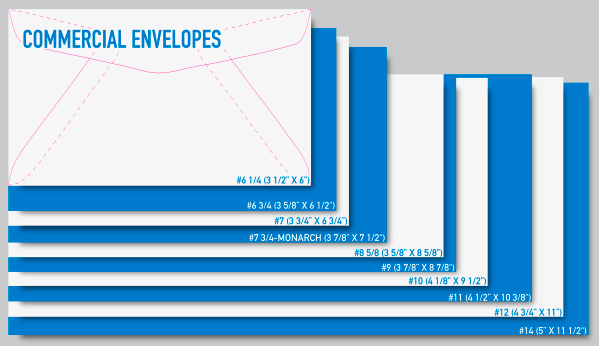
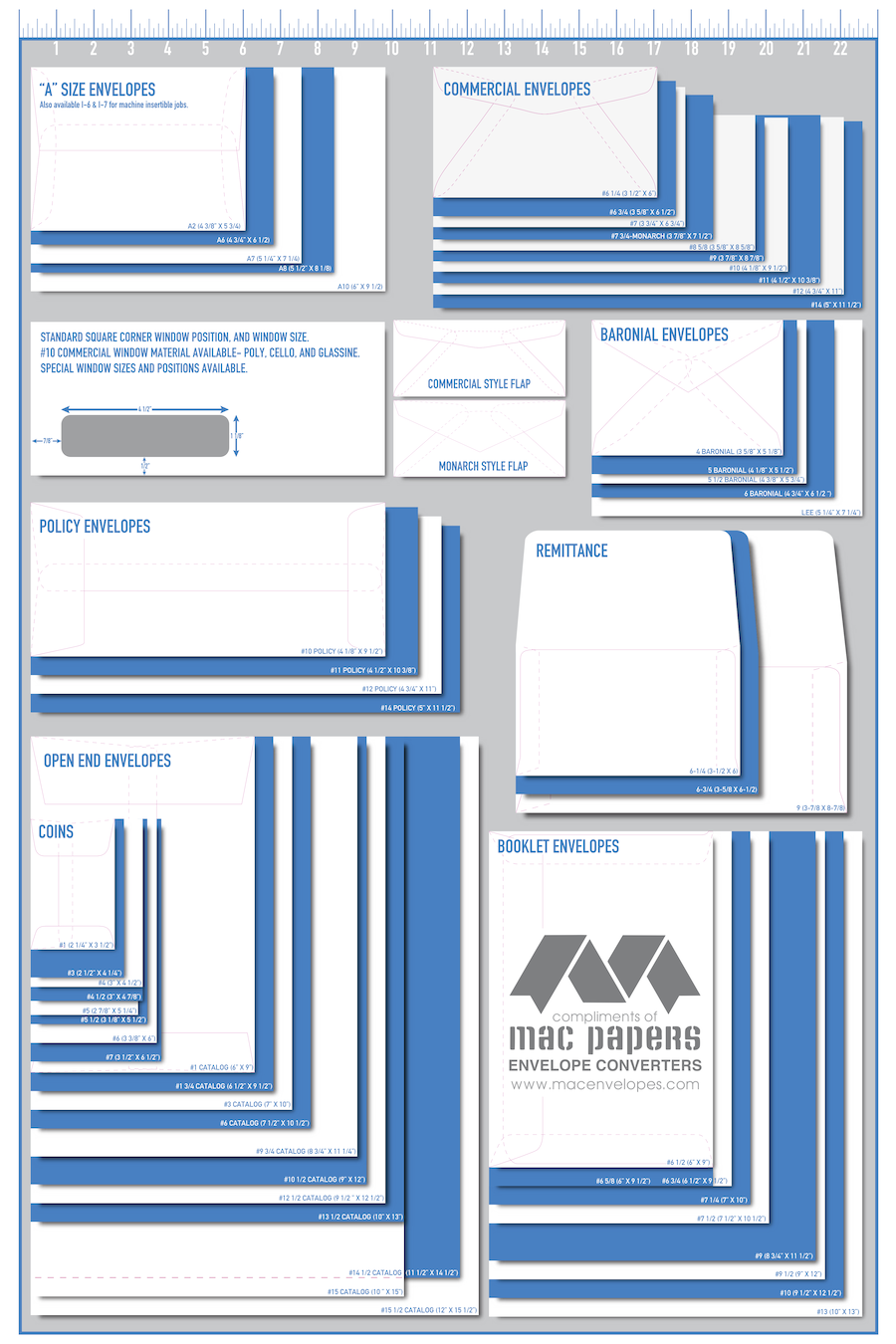
Once you start looking into creating a mailing, you’ll discover there are countless different envelope types, sizes, colors, textures, etc. to choose from. So many so, it could get a little confusing.
However, you can simplify things just a bit by choosing a white #10 envelope. This is by far the most common size and color for business mailings and is sometimes called a “business”, “business-sized” or sometimes even “commercial-size” envelope. We recommend you call it a “number ten” (#10) envelope, as this provides a more exact description. A #10 envelope is 4-1/8” tall and 9-1/2” wide. This envelope can easily hold 1 – 10 pieces of 8.5” x 11” paper.
Once you choose your envelope size, there are a few more items to consider. Do you need security tint? This is the special shading or print inside an envelope which reduces the amount of snooping that can occur by someone trying to look through the envelope. We recommend security tint for financial transactions as well as bills, statements, invoices and medical information. (Actually, nearly every #10 window envelope we use has security tint.)
Another question is what sort of flap do you need? If you are going to seal them by hand, get creative and find something you like (and get a glue stick for quick sealing), or choose the peal off, moisture-free seal style. The latter costs a little more, but some people like this cleaner process. If, on the other hand, you are hoping to have someone else (like LetterStream) seal them on a machine, you’ll want to skip the peal-off style, and pass on fancy edges on the envelope flaps. When sealing envelopes on machines, you’ll want to find machinable envelopes. These envelopes have a rounded, v-shaped flap with no points, no square corners and no fuzzy edges that will hang on the machine.
And of course we can’t forget to ask whether you need windows in your envelopes. Most bills/statements/invoices are mailed in window envelopes. This is far more efficient if you have additional information in the document that pertains to the person you are sending the mail to. It helps to have the person’s name on the actual bill, so it goes to the right person.
We recommend window envelopes for most mailings because we know people will think it’s a bill and open it. However, if you want a little more intrigue or simplicity, go with windowless envelopes.
If you really want to get creative, there are countless other options to choose from. You can even create your own custom size and shape envelope by contacting an envelope converter. Just remember that uniqueness adds to the cost.
Here at LetterStream, we primarily use one of the following types of envelopes: #10 window with security tint, #10 windowless plain white, 10 x 13 windowed white flat, or our proprietary USPS-approved Certified Mail envelope. And you can be sure that ALL our envelopes have machinable flaps so we can insert and seal tens of thousands per hour (yes, you read that right).
We have other envelopes too, including #9, #8, 5×8, 6×9, and 6 3/4, to name a few. But most of these are used as return or remittance envelopes that are included in a mailing.
I hope this little envelope training has been helpful, if not inspiring. 😉
If you still have questions, contact us and we’ll point you in the right direction!
If you need to get a mailing out the door quickly, our Express Letter option is about the quickest way to get it done.
Here’s all we need from you:
1. A mailing list saved as a CSV file
Most software allows you to export addresses in CSV format, and MS Excel allows you to save your spreadsheet as a CSV (comma separated values) format.
Check out our YouTube video for assistance:
2. Your document saved as a PDF
There are various ways to create a PDF from an MS Word document. Word 2010 has the option included. You can also use Adobe products or download a free PDF tool at primopdf.com.
See our help video for more information:
When you have these two items, log into (or sign up for) your LetterStream account and choose Express Letter as the job you want to create. You’ll be prompted for your address list and your document (or documents). If you have a logo with your return address built into it, you can even use it for the outside of the envelope.
There are other options as well:
the ability to share a proof with others
notification when mailing is complete
the ability to add newsletters, fliers or other documents to the mailing
the ability to add additional promotional wording to the outside of the envelope
See our YouTube video for help with this:
What do we do next?
We print your document in black and white or color print
We print your document on white or color paper
We address a #10 white envelope with your return address and recipient name
We add USPS First-Class postage
We fold your document(s), put them in the envelope, seal and mail them
We guarantee you’ll be pleased with the speed, quality and service you receive from LetterStream, every step of the way.
Still not convinced? Click here for more information about sending Express Letters via LetterStream.
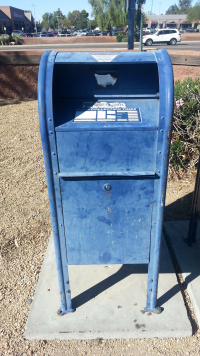
Some of you know exactly where your favorite blue drop box resides. But I bet most of you drive past these uniquely shaped blue boxes each day and don’t even notice them.
I came across a CNN.com article that claims there are as many as 160,000 of these blue collection boxes in use around America.
If you are having a hard time finding the nearest blue box to drop your outbound mail in, there are a few apps that can help you out. For Android, check out the USPS Mobile or Mail Box Locatorapps. You can also try MailboxMap.com from your computer or smart phone to see where all 160,000 drop boxes are located.
I like Mailbox Locator because it is simply about finding the nearest drop box, and it uses your phone’s GPS to quickly route you to the nearest one. It also shows you the pick-up days and last pick-up times so you know if you’ve still got time to get your letters in the mail that day.
In case you’re wondering, at LetterStream we don’t place our mail in the blue boxes or inour own mail box. We don’t even drop our mail off at the retail counter of the local post office. Instead, our mail gets trucked to the USPS BMEU (Business Mail Entry Unit), for fast, same-day processing of our mail, even after the post office retail window is closed.
Keep an eye out for those little blue boxes and see how many you can count on your way to work this week; you might be surprised.
Of course, when faced with an urgent mailing, skip the box and contact LetterStream instead!